


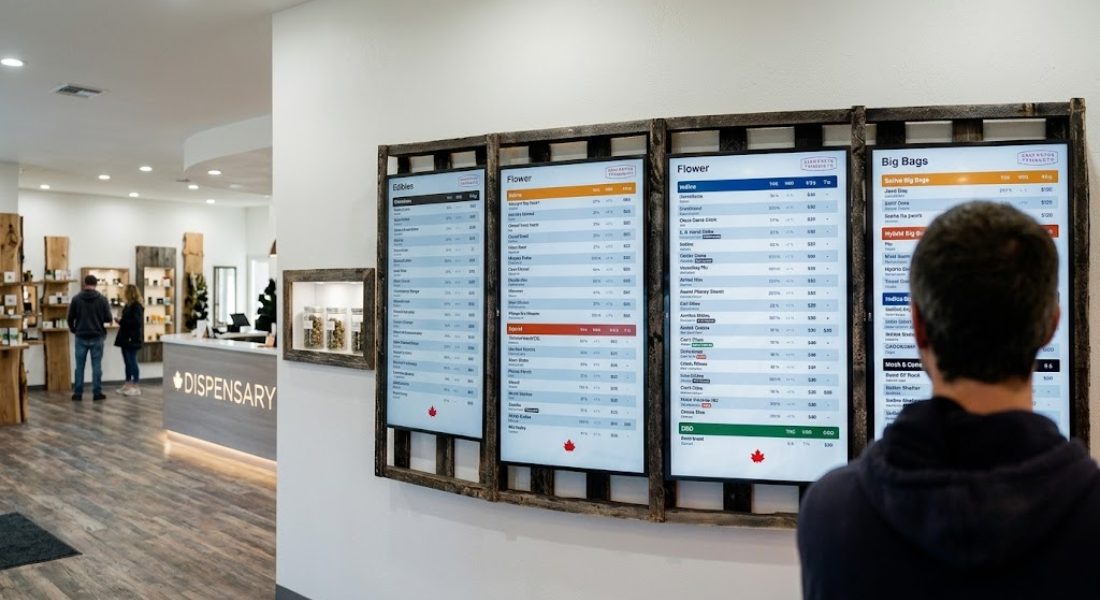
Creating an inviting and efficient retail environment is a top priority for dispensary owners, and your in-store menu boards are the centerpiece of that experience. Finding the right dispensary tv setup hardware is the foundation of a reliable, high-performing digital menu system that engages your customers from the moment they walk through the door. Ensuring you have the correct equipment allows for a seamless BudSense TV app installation, keeping your menu boards live, accurate, and professional without constant technical troubleshooting.
Selecting hardware that can handle the rigorous demands of a retail environment—such as continuous operation, high-resolution graphics, and automated cloud updates—is vital. This guide breaks down the essential components needed to get your dispensary digital signage running at peak performance, ensuring your store remains a trusted authority in the community.
Essential Components for Your Dispensary TV Setup
A robust digital menu system requires more than just a television screen. The backbone of your setup is the media player, which acts as the "brain" of your display.
1. The Media Player
For most cannabis retailers, an Android-based streaming stick or box is the best media player for cannabis digital menus. These devices are compact, affordable, and powerful enough to render high-definition imagery and real-time menu data. Devices like the Buzz TV stick are widely favored for their stability, ease of configuration, and compatibility with dedicated menu management apps.
2. The Display
When choosing a TV for your menu board, prioritize "commercial-grade" displays if possible. While consumer TVs work, commercial monitors are designed for 16/7 or 24/7 operation, meaning they handle heat and extended runtimes much better than home TVs, ensuring your investment lasts longer.
3. Connectivity and Power
-
Networking: A stable Wi-Fi 6 connection or a hardwired Ethernet connection is essential for live inventory updates.
-
Power: Ensure your media player has a dedicated, reliable power source to prevent random reboots that can disrupt the customer experience.
Optimizing Your Digital Signage Setup
Once you have selected your dispensary tv setup hardware, the focus shifts to configuration. Following standardized buzz tv stick instructions simplifies the process, allowing you to get your content on-screen in minutes.
How to Run Digital Signage on Android TV Stick
-
Hardware Connection: Plug your media player into the HDMI port of the TV. If the device has an IR sensor, place it in an accessible spot so the remote can communicate effectively.
-
Initial Configuration: Follow the on-screen prompts to connect to your store’s Wi-Fi. A stable network is the most important factor in maintaining how to set up digital menu boards that update in real-time.
-
App Integration: Once online, install the necessary management software, such as the BudSense app. This creates the bridge between your live POS data and your in-store displays.
-
Pairing: Use the unique code provided by the app to link your media player to your central content management system. This is where your dispensary tv media player setup becomes fully automated.
Addressing Retail Concerns: Clarity Over Complexity
Retailers often worry about the complexity of high-tech hardware, especially when dealing with high-strength products that require detailed labeling. The beauty of a digital setup is that it allows for clear, factual communication without the need for cluttered or messy signage. By using a clean, professional digital layout, you can present product information—such as strain lineage, terpene profiles, and aromatic qualities—in an organized way that helps customers make informed choices without feeling overwhelmed. Providing objective, factual information is the best way to address concerns about potency while remaining strictly compliant with industry standards.
Conclusion: Elevating Your Store with BudSense
A well-executed digital menu system is a key differentiator in the modern cannabis industry. By investing in the right dispensary tv media player setup, you ensure that your store feels modern, professional, and efficient.
Once your hardware is in place, you can fully leverage the tools provided by BudSense. For detailed steps on getting your specific hardware ready, be sure to review our Buzz TV stick instructions. To learn more about how we can help you streamline your retail experience, visit BudSense and see how our solutions can work for your dispensary.
Frequently Asked Questions
What is the best hardware for a dispensary digital menu?
We recommend reliable, Android-based media players like the Buzz TV stick. They are optimized for the continuous playback of dynamic content and provide the best balance of affordability and high-performance reliability for retail environments.
Why should I choose a commercial-grade TV over a standard home TV?
Commercial-grade displays are built for longevity. They feature better heat dissipation and are rated for the long operating hours required by a retail dispensary, reducing the risk of screen burn-in or hardware failure.
Is a wired Ethernet connection better than Wi-Fi for my TV setup?
Yes. While Wi-Fi is often sufficient, a hardwired Ethernet connection provides the most stable experience. It ensures that your menu content remains uninterrupted by local network interference, keeping your product information live and accurate at all times.
How does the Buzz TV digital signage setup help with compliance?
By using a centralized digital system, you can ensure that all product information is accurate, up-to-date, and compliant with local regulations. It allows for quick updates to menus across multiple screens or locations simultaneously, reducing the chance of displaying outdated or incorrect product information.

 English
 French
 Spanish
 Portuguese
 Deutsch
 Turkish
 Dutch
Dutch
 Italiano
 Russian
 Romaian
 Portuguese (Brazil)
 Greek
Greek