


A reliable home network depends heavily on correct Ethernet cabling, and one of the most important parts of that setup is the RJ45 connector wiring. Whether you are connecting a router, switch, or directly linking devices, understanding the correct wiring pattern ensures stable internet performance and avoids connectivity issues.
This guide provides a clear RJ45 connector wiring color sequence explained in a simple, practical way. By the end, you will understand the two major wiring standards, how the color codes work, and how to apply them for home networking.
Understanding the RJ45 Connector and Its Role in Networking
The RJ45 connector is a standardized physical interface used for Ethernet networking. It contains eight pins, each corresponding to a specific wire inside the Ethernet cable. These wires must follow a precise color order to ensure proper data transmission between devices.
In home networking, RJ45 connectors are commonly used for connecting computers, routers, modems, gaming consoles, and smart TVs. Even a small mistake in wiring can lead to slow speeds or complete connection failure, which is why understanding the correct structure is essential.
The Importance of RJ45 Wiring Color Standards
When discussing RJ45 connector wiring color sequence explained, it is important to know that there are two globally accepted standards: T568A and T568B. Both define how the eight wires inside the cable are arranged in the connector.
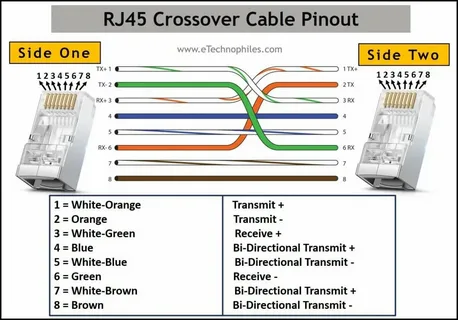
The main difference between these standards is the placement of the green and orange wire pairs. While both can function correctly, consistency is crucial. Mixing standards on both ends of a cable can cause a crossover connection, which is sometimes useful but often leads to confusion in home setups.
T568A Wiring Color Sequence Explained
The T568A standard is often recommended for residential and government installations. Its color sequence is: white/green, green, white/orange, blue, white/blue, orange, white/brown, and brown. This arrangement ensures compatibility with older telephone systems while supporting modern Ethernet connections.
In home networking, T568A is less common than T568B but still fully functional. If both ends of a cable use T568A, the connection is straight-through, meaning data flows normally between devices without alteration or interference.
T568B Wiring Color Sequence Explained
The T568B standard is the most widely used wiring method in commercial and home networking environments. Its sequence is: white/orange, orange, white/green, blue, white/blue, green, white/brown, and brown. This is the default choice for most pre-made Ethernet cables.
When applying the RJ45 connector wiring color sequence explained in practical setups, T568B is usually preferred because it aligns with most modern networking equipment. Like T568A, using T568B on both ends creates a straight-through cable suitable for routers, switches, and computers.
Straight-Through vs Crossover Cables in Home Networking
A straight-through cable uses the same wiring standard on both ends, either T568A–T568A or T568B–T568B. This is the most common type used in home networks and is ideal for connecting different devices such as a computer to a router or switch.
A crossover cable uses T568A on one end and T568B on the other. This configuration swaps transmit and receive signals, which was historically used for direct device-to-device connections like PC-to-PC. However, most modern devices now support auto-MDI/MDIX, making crossover cables rarely necessary in home environments.
Step-by-Step Tips for Proper RJ45 Wiring at Home
Before crimping an RJ45 connector, always strip the cable carefully to avoid damaging the inner wires. Untwist the pairs just enough to arrange them in the correct order while keeping the twists as close to the connector as possible to reduce interference.
After arranging the wires according to your chosen standard, insert them firmly into the RJ45 plug and ensure each wire reaches the end. Use a crimping tool to secure the connector. Testing the cable with a network tester is highly recommended to confirm proper wiring and avoid future connectivity issues.
Conclusion
Understanding the RJ45 connector wiring color sequence explained is essential for building a stable and efficient home network. Whether you choose T568A or T568B, consistency and proper technique are key to ensuring reliable data transmission.
With the right wiring knowledge, you can confidently set up Ethernet connections, troubleshoot network problems, and improve your overall internet performance at home.

 English
 Arabic
 Spanish
 Portuguese
 Deutsch
 Turkish
 Dutch
Dutch
 Italiano
 Russian
 Romaian
 Portuguese (Brazil)
 Greek
Greek